
B.1 The four layers
Orange = commands going down · Steel = data coming back up (scans, odometry, battery, events).
Open the original report drawing (system architecture)
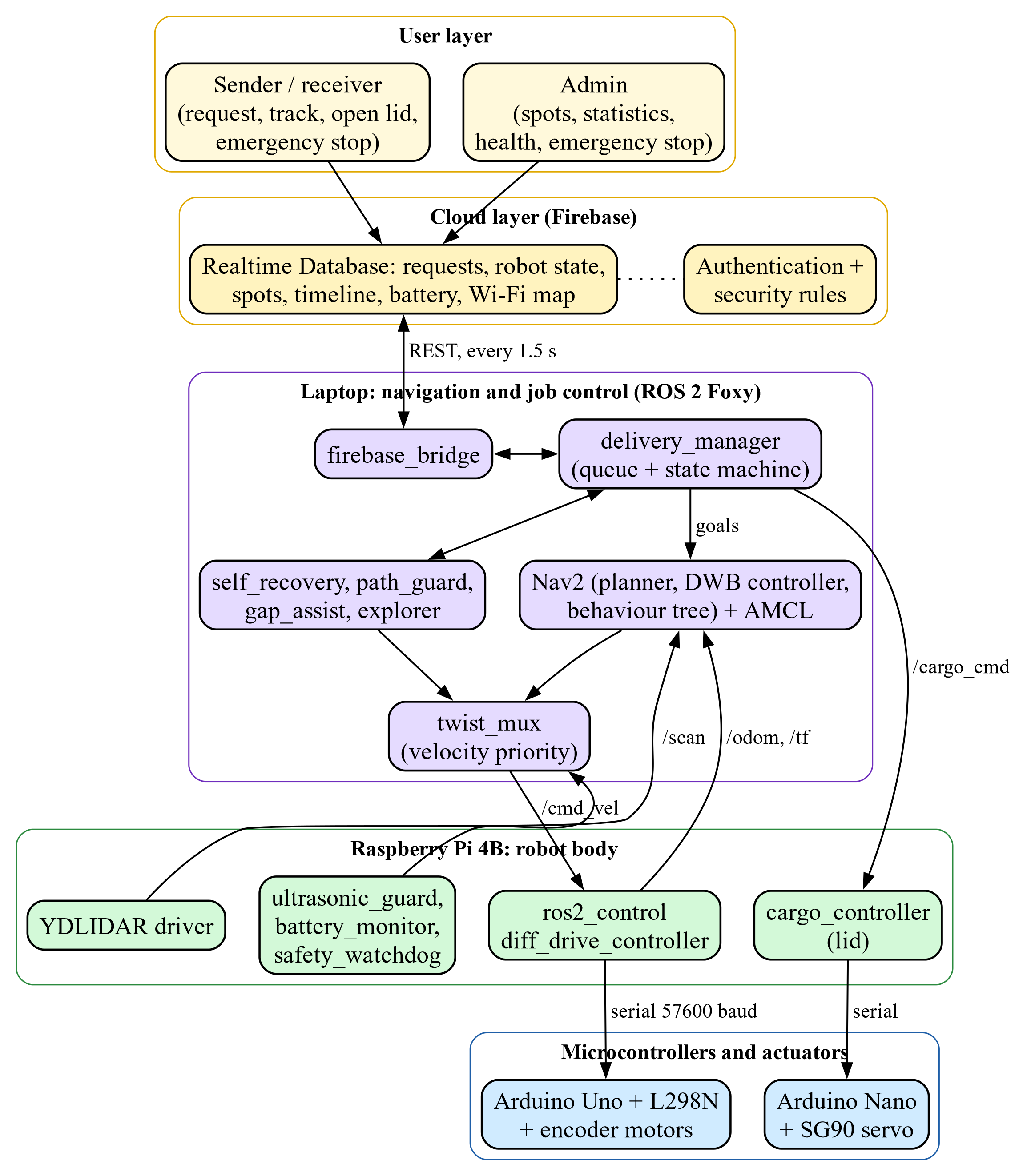
LAYER 1: WEB APP (phone / PC browser) Firebase Hosting, JS in web/ | HTTPS login (Firebase Auth), buttons, status cards v LAYER 2: FIREBASE REALTIME DATABASE (cloud) requests, status, robot pose, stats, battery, ^ HTTPS REST (stdlib urllib, no SDK) health, Wi-Fi map, change map, timeline | LAYER 3: LAPTOP "BRAIN" (Ubuntu 20.04, Foxy) needs internet for Firebase | firebase_bridge <-> delivery_manager -> Nav2 (NavigateToPose action) | AMCL + map_server, self_recovery, path_guard, gap_assist, twist_mux, events, stats ... | | ROS 2 DDS (Fast DDS) over Wi-Fi, ROS_DOMAIN_ID 0, same network v LAYER 4: ROBOT (Raspberry Pi 4B, Ubuntu 20.04 server, Foxy) | ydlidar driver -> /scan ros2_control (diff_cont) -> /odom, TF odom->base_link | safety_watchdog, ultrasonic_guard, battery_monitor, cargo_controller, wifi_probe | +-- USB /dev/ydlidar ---- YDLIDAR X2 +-- USB /dev/arduino ---- Arduino Uno: L298 driver, 2 encoder motors (57600 baud, PID in firmware) +-- USB /dev/servo_nano -- Arduino Nano: lid servo (D9), lock servo (D10) +-- GPIO 23/24 ---------- HC-SR04 ultrasonic +-- I2C 0x40 ------------ INA219 battery sensorRules to remember:
- The phone never talks to ROS. It talks to Firebase. Only
firebase_bridge.pyon the laptop talks to both Firebase and ROS. - The laptop does the heavy work because the Pi is too weak for Nav2 plus AMCL plus our nodes together. The Pi does only what must be physically near the hardware.
- Safety nodes that must work even when Wi-Fi is bad (safety_watchdog, ultrasonic_guard’s own sensor read) run on the Pi. Known weak point:
twist_muxruns on the LAPTOP, so every wheel command makes a round trip over Wi-Fi. Moving twist_mux to the Pi is the standing “future” option. - Foxy has no stamped Twist for diff_drive_controller, so all velocity commands are plain
geometry_msgs/Twist.